CVS HEALTH · 2022–2023
Pharmacy Dashboard North Star
Unifying three lines of business — CVS Retail, Caremark, and Specialty — into one prescription management hub that treats caregivers as first-class users.
MY ROLE
Desgin Lead
PLATFORM
Web (Desktop)
SCOPE
Research · Facilitation · UX + UI

3
Separate platforms — CVS Retail, CVS Caremark, and CVS Specialty — forcing users to context-switch across interfaces just to manage their own prescriptions.
1 in 4
Americans acts as a caregiver for someone else's medications — yet the existing pharmacy dashboard had no way to represent or manage another person's health.
0
Unified entry points. Every "manage your health" task scattered across nav, settings, and disconnected portals — maximum friction for the moments that matter most.
OVERVIEW
Ambitious by design.
That's the point.
A North Star isn't a roadmap item. It's a provocation — a vision ambitious enough that it pulls the team forward across multiple years, even when constraints make every version a compromise.
This initiative reimagined the CVS pharmacy dashboard from scratch. No constraints. No legacy system excuses. Just: what would it look like if CVS treated prescription management as a unified, human-centered experience?
The answer had to span all three lines of business and center the people who manage medications for others, not just themselves.
THREE LINES OF BUSINESS
CVS Retail
In-store & online pharmacy
CVS Caremark
Pharmacy benefit management
CVS Specialty
Complex & specialty medications
Users enrolled in multiple LOBs had no central place to see the full picture. This is the problem we were built to solve.
This initiative reimagined the CVS pharmacy dashboard from scratch. No constraints. No legacy system excuses. Just: what would it look like if CVS treated prescription management as a unified, human-centered experience?
The answer had to span all three lines of business and center the people who manage medications for others, not just themselves.

ROLE
Design lead across research, facilitation, and execution.
I owned this project end-to-end. That meant structuring the research approach, facilitating a multi-day cross-functional workshop, running design sprints, and producing high-fidelity prototypes through to testing.
UX Research
Workshop Facilitation
Sprint Design Lead
SCOPE & CONSTRAINTS
Web-only. All three LOBs. Time-boxed.
We scoped to the web dashboard — not the mobile app — and committed to including all three CVS lines of business from day one. The primary constraint was time: we needed to move from research to tested prototypes within a defined window, which shaped every facilitation and prioritization decision we made.
Prototyping & Testing
"Users engaged across multiple CVS business lines had no single place to see their full health picture — and no way to manage the health of the people they care for."
NORTH STAR RESEARCH SYNTHESIS· CORE PROBLEM STATEMENT
HOW WE GOT HERE
Research. Workshop. Sprint. Test.
We ran a rigorous discovery phase before touching a single screen — anchored by analytics, empathy mapping, and a structured design sprint that brought cross-functional voices into the design process from the start.
01
Analytics Deep Dive
Adobe Analytics heat maps + call center data to understand where users struggled in the existing dashboard.
02
Empathy Mapping
Multi-day workshop with designers, stakeholders, accessibility experts, and content strategists across all three LOBs.
03
A/B Iteration
Two dashboard variants designed and tested — minimal vs. content-rich — to resolve a core tension between UX and product.
04
Design Sprint
5-day sprint: understand, diverge, converge, prototype, test. Two high-fidelity prototypes produced and validated.
05
Prototype Testing
Testing via usertesting.com with real users against defined task flows and UX criteria.
DISCOVERY
Start with how
people actually behave.
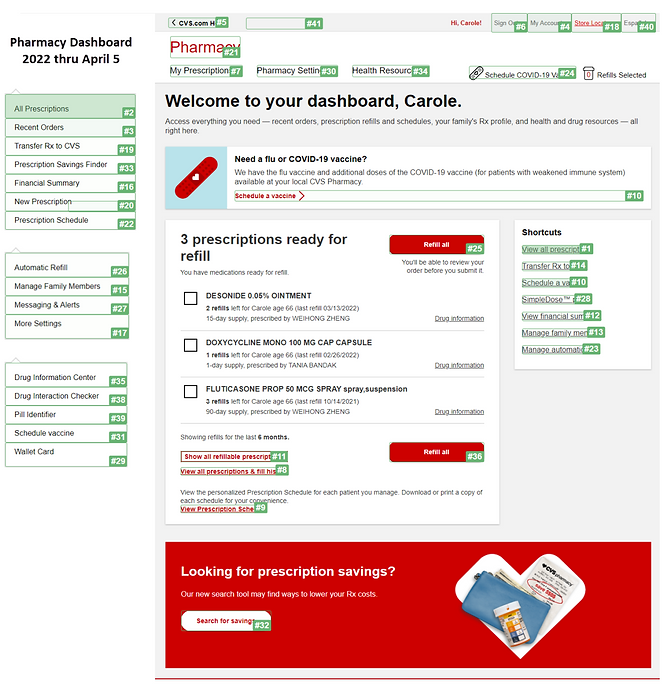
Before generating a single solution idea, we ran two complementary analyses: Adobe Analytics heat maps on the existing dashboard, and a deep dive into call center data to understand where users were hitting walls.
The call data told a sharp story. The top six call topics — Rx Status Check (28.25%), Refill Rx (22.50%), Responding to Outbound Messages (9.75%), COVID-Related Questions (7.50%), Transfers (6.50%), and Stock Check (5.25%) — accounted for nearly 80% of all inbound calls. These weren't edge cases. They were the core jobs users came to do, and the dashboard wasn't doing them.
The heat map confirmed it from the other direction: users were scanning widely, not finding what they needed, and exiting through unexpected paths. Together, the two data sources gave us something precise — not just "the dashboard is confusing," but exactly which tasks needed to be surfaced, and where the architecture was failing the people trying to use it.

WORKSHOP
Build shared understanding
before you build solutions.
Part of our workshop was dedicated to empathy mapping — getting a cross-functional group to sit with what our users actually think, feel, say, and do when managing prescriptions for themselves and others.
The insights from that session were pivotal. Users' core objectives came into focus: effective prescription management, streamlined access to health information, and clear entry points for the actions that matter most.
That clarity went directly into how we structured the MVP information hierarchy.
THE DESIGN TENSION
UX said less.
Product said more.
When we began iterating on an MVP dashboard, the product team pushed to include a suite of profit-generating programs alongside core prescription tasks. The UX team had a clear hypothesis: content overload would pull users' attention away from the primary jobs-to-be-done.
Rather than debate, we tested. We designed two variants — one focused and lean, one content-rich — and ran an A/B test to let the data decide.
The result validated the UX perspective: the lean design outperformed on task completion and user confidence. But the test also gave us a productive outcome: both variants contributed insights that shaped the final sprint direction.
Variant A - Lean
WINNER

Variant B - Rich

The lean design assisted users in more efficiently handling their prescriptions — confirming the UX team's hypothesis that minimal content wins on primary task performance.
DESIGN SPRINT
Five days.
Three LOBs.
Two prototypes.
Armed with A/B test findings and a clear design direction, we leveled up with a structured 5-day design sprint — this time with the explicit goal of spanning all three lines of business and representing caregiver functionality.
I assembled a diverse sprint team: designers, stakeholders, accessibility specialists, and content strategists from each LOB. Getting everyone in the room — not just observers, but co-creators — was a deliberate facilitation choice.
DAY 1
Understand
DAY 2
Diverge
DAY 3
Converge
DAY 4
Prototype
DAY 5
Test
UX Designers (3 LOBs)
Accessibility Experts
Product Stakeholders
Content Strategists

One of many sketches completed on Day 3 to Converge
THE KEY INSIGHT
Caregivers aren't edge cases.
They're the center.
During the sprint's understanding phase, one theme kept surfacing across every LOB: users weren't just managing their own medications. They were managing their child's. Their spouse's. Their aging parent's.
The existing dashboard had no concept of this. You logged in and saw only your prescriptions. If you were Eleanor managing Capecitabine for yourself, Glucophage for your husband Peter, and Tylenol for your daughter Amanda — you had no unified view.
Making caregiver relationships a first-class feature of the dashboard became one of the defining decisions of this North Star.

FINAL PROTOTYPES
Two prototypes.
One clear winner.
Both informed the final direction.
The sprint concluded with two high-fidelity prototypes tested on usertesting.com. Both performed well on usability benchmarks — but Prototype 1 outperformed on cognitive load metrics, validating the lean-first direction we'd established earlier in the process.
Prototype 1 - Lean Dashboard
Winner — superior task completion and confidence scores

Lower cognitive load · Cross LOB prescription view · Caregiver switching
Prototype 2 - Rich Dashboard

Benefits & programs · CVS Caremark deductible · Manage your health hub
"Users benefit substantially from a unified hub — one place to oversee prescriptions for themselves and everyone in their care, across all three CVS business lines."
USERTESTING.COM RESEARCH FINDINGS · DESIGN SPRINT OUTCOME
WHAT WE PROVED
The North Star landed.
Now it can guide the roadmap.
A North Star project succeeds when it gives teams a clear direction to orient toward — and this one did. We validated the core hypothesis, resolved the UX/product tension around content density, and gave every LOB team a shared vision to build toward.
More than that: we proved that the caregiver use case isn't a nice-to-have. Users who manage medications for others have distinct, high-stakes needs that the current dashboard ignores — and addressing that is a real competitive opportunity for CVS.
→ Unified view across all three LOBs validated as the right architectural direction by cross-functional sprint team and end users
→ Lean-first dashboard design outperformed content-rich variant — confirmed the UX team's hypothesis about cognitive load and task focus
→ Caregiver first architecture established as a core product requirement for future dashboard iterations across all three business lines
→ Sprint methodology and cross-LOB facilitation model now adopted as a repeatable process for future North Star initiatives